Fresh Acorn 7, Acorn 6, & Retrobatch Test Builds
Acorn 7
Download: Acorn 7 Preview.zip (7.4.5b1 (16461) )Updated March 21, 2024 03:35:32 PM
Automatically updating to the release or test versions of Acorn
Auto-update to test releases (newest, super fun development releases)Auto-update to regular releases (boring old production releases)
Acorn 7.4.5
?!, 2024.
# Bug Fixes.
- Fixed a problem where the Brush Designer wouldn't let you try out your carefully crafted brush.
- Fixed a problem where the Animated GIF export setting for "Use original FPS" wouldn't always work as expected.
Acorn 7.4.4
February 22nd, 2024.
# New Stuff.
- Super Resolution ML resizing. This new option in the Image ▸ Resize Image… menu item lets you increase the size of your image up to 4x using Machine Learning. Or is it AI now? I don't know and don't care, but it's pretty awesome! It packs a ton of crazy statistics and math into a simple little dropdown menu. Give it a shot for your photos, you won't be disappointed. (Super Resolution is for MacOS 12 or later only).
- Stroke Selections! Finally. You can now perform this long requested feature via the Select menu, and even works with Magic Wand selections (MacOS 11 or later only). Change your stroke size, blending, anti-alias or not, and even add a fill.
- You can now convert Magic Wand selections to shape layers. This is also super awesome! If you've got a fun outline of something that you want to convert into a shape, this is the way. (MacOS 11 or later only).
- New "Simple Film Grain" filter, which will add a grainy overlay to your image. Just like Grandpa's photos used to have.
- The Text Palette now shows what the font looks like in the font pop-up menus.
- Holding down the backslash key ('\') will temporarily switch off any layer filters you have on selected layers.
- Neat new trick with the Shortcuts Crop action: If you choose "Custom" as the position and put in negative values, the canvas will expand instead of shrink. A negative X value will increase the size on the left, Y on the bottom, Width on the right, and Height for the top.
- Various little improvements to the File Info window, including shortcuts (Command 1-4) to switch between the sections.
# Other.
- Double clicking on a non-bézier shape with the anchor select tool will now convert it to a bézier shape (previously this only worked with the move tool (shortcut key 'v').
- The tool palette will now dim tools that you can't use in modal operations (such as when cropping, scaling and rotating, and similar operations).
- A new Shortcuts action to open images in Acorn.
- Various improvements to Acorn's SVG importer.
- Tweaks to the Image Resize window.
- Tweaks to the Image Meta Data window (which you can get to from the File ▸ File Info… menu).
- The AppleScript command
do filter name "Your Filter Preset Name Here"will now work with filter presets as well. This is in addition to thecall filter preset with namecommand. There is a story behind this. It isn't very good. - Various little fixes in the French localization, with a big thanks to Corentin Cras-Méneur for finding those.
- Acorn is now putting PNG data on the clipboard when using ⌘C in addition to TIFF data (it was previously only doing this for Copy Merged - ⌘⌃C).
- Acorn is no longer declaring itself as the default editor for a couple of file types, including HEIC (sorry about that!).
- Acorn now shows a warning when trying to open up a EPS file on MacOS 13 or later (Apple has unfortunately removed support from MacOS).
# Fixes.
- Fixed a regression from Acorn 6, where you could drag and drop layers to the + button in the palette to duplicate it, as well as dragging it to the trash button to delete it. So those work again, which is awesome and feels nice.
- Fixed a bug where blendable layer filters wouldn't always blend correctly when you viewed your image zoomed out.
- Minor Export window improvements and localization fixes.
- Minor text tool and color picker interaction fixes.
- Fixed a drawing issue where the canvas was at wackadoodle zoomed out sizes (thanks magic mouse), and trimmed up bitmap layers were leaving little pixel remains behind when you moved the layer with the arrow keys.
- Fixed a problem where adding a Hue Shift shape processor without changing its default values would cause problems when trying to save your image in the Acorn file format.
- Fix for a crasher on some Macs when attempting to create Metal Contexts.
Acorn 7.4.3
September 25th, 2023.
# Little New Features.
- The selection palette now lists the number of pixels you have selected!
- The trick for cropping a layer without resizing a canvas will now work when you have multiple layers selected. (The trick is to hold down the option key when finishing up your crop. It's neat, try it! You can quickly cut cruft out of your layer(s) without having to change the size of your image). Cropping a shape layer will also remove graphics outside the crop bounds now.
- New Auto Level / Straighten action in the Command Bar, and when holding down the option key when choosing the Layer menu (as an alternate to "Auto Enhance"). This will tell Acorn to take a good guess at leveling out your picture.
# Super Minor Stuff.
- When importing SVG files, polygon tags are read into bezier shapes.
- Layered screenshots now include the cursor.
- When taking a layered screenshot with a specific application defined, the menu bar is now included.
- The crash report checker would always check if a new version was available, even if you had the option to check for updates turned off. This oversight has been corrected and the programmer responsible given twenty lashings.
# Bug Fixes.
- Fixed some drawing issue which appeared on MacOS 14 (Sonoma).
- Fixed a problem where the system color picker would try and match color profiles between two different images which didn't match, and go a little nuts.
- Fixed a problem where sometimes setting the box fill color of a text shape would also change the text fill color as well. Whoops, sorry about that. It's fixed now though!
- Fixed a bug where you'd get a warning when trying to save a file in .acorn format which was previously in .webp.
# JavaScript Stuff.
- Acorn now comes with a little console window you can open up via the Command Bar (it's named "Console"). Any output from JavaScript plugins will go here (via `console.log()`).
# Weird Hidden Experimental Stuff.
- I'm playing around with the idea of automatically removing the file type and last saved location to flat files (such as PNG or JPEG) when adding layers to them. This is for cases where you open up a PNG, add text, and then want to save it as a .acorn file (mostly automatically) because you'd love to preserve the layer data and saving it right back to a PNG will ruin that idea. And Acorn throwing up a dialog box telling you this kind of gets in the way. So here's a hidden pref (copy + paste into the Terminal app and press return) to enable it:
defaults write com.flyingmeat.Acorn7 updateFlatToAcornFormatWhenAddingLayers 1
If you try it out, I'd love to hear how it's going for you.
Acorn 7.4.2
May 8th, 2023.
# New Screenshot Stuff.
- Delayed layered screenshot: Hold down the option key when choosing the Image ▸ New Image from Layered Screenshot menu item and Acorn will wait an extra 10 seconds before taking the screenshot. This is awesome if you want to quickly switch to another app and open up a menu item.
- New Shortcuts action to take screenshots. Layered or not, with or without shadows, only for a certain app, and even with a little delay. MacOS 11+ only.
- New AppleScript command "screenshot" which you can use to take a layered screenshot, with various options including an option to only capture a specific app. Here's an example:
tell application "Acorn" to screenshot app "Mail" delay 4 with layers and hiding shadows. You can also use "bundle identifier" instead of "app" to target a specific app name.
# Fixes and Other Stuff Pertaining to the Clone Tool.
- New option "Hide clone source widget" in the palette, which does exactly what it says on the tin.
- Pressing the shift key now shows the correct stamp preview.
- Other little tweaks, such as updating the hint text correctly.
# More Fixes
- Fixed a problem where the quick mask tool wouldn't work correctly on M1 & M2 Macs with a 64 bit image.
- Fixed a redraw problem when entering full screen when the grid was showing (and you had "Super scrollable canvas" turned off).
- Fixed a problem where the perspective transform tool wouldn't give a correct preview.
Acorn 7.4.1
May 1st, 2023.
# Fixes
- Fixed a problem where the clone tool could hang on certain Macs.
Acorn 7.4
April 27th, 2023.
# New Stuff
- Big Clone Tool Improvements. The clone tool has been updated to give you a preview of what your brush stroke will look like before drawing. In addition, a new on canvas widget is available which lets you know exactly where the source is coming from, which you can move around to pick a new clone source. Pressing the option key to reassign a clone location still works as usual. And just like the previous iteration of the clone tool, you can clone from other images or layers into any bitmap layer.
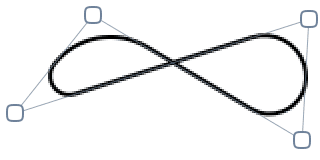
- Corner Radius for Bézier Curves and Stars: Bézier curves where two straight lines join can now have a corner radius! This is pretty cool, and a great way to round out a shape for a logo or for a sign. The star shape also gets to join in on the fun.
- Super accurate colors via floats in the color palette: What's the point of having access to over 281 trillion colors (79 octillion for 128 bit images!) if you can't actually set them with super decimal precision? Now you can with Acorn's custom color picker. Switch between 8-bit, Percentage, and now 32-bit Float for displaying and setting your RGBA values.
- New Command Bar actions: "Hide All Layers" and "Show All Layers"
- New AppleScript command "do command bar action" which will do a fuzzy string search of the given command, and then invoke it. For example:
tell application "Acorn" to tell document 1 to do command bar action named "Fill Layer With Stroke Color"
Will call the "Fill Layer With Stroke Color" action. The following example will also call it, since fuzzy string matching is used:
tell application "Acorn" to tell document 1 to do command bar action named "Fill Layr str"
- New AppleScript command "append filter", which can be used to add a non-destructive Core Image filter (with optional parameters) to the currently selected layer. For example:
tell document 1 to append filter name "CICheckerboardGenerator"
Will add a checkerboard filter to the current layer.
tell document 1 to append filter name "CICheckerboardGenerator" with parameters {inputWidth:10}
Will add a checkerboard filter to the current layer, with the width of the boxes to 10 pixels.
tell document 1 to append filter name "CIMotionBlur" with parameters {inputRadius:32}
Will append a motion blur filter.
set color0 to {0.25, 0.32, 0.40} -- RGB values between 0.0 and 1.0

                set color1 to {1.0, 0, 0, 0.5} -- pure red, with 50% alpha.

                append filter name "CICheckerboardGenerator" with parameters {inputColor0:color0, inputColor1:color1}
Will append a checkerboard filter to the current layer, with two different colors.
set color0 to "#4a525a" -- HTML hex colors

                    set color1 to {1.0, 0, 0, 0.5} -- pure red, with 50% alpha.

                    set point0 to {0, 0} -- lower left of canvas

                    set point1 to {500, 500} -- top right of this particular canvas

                    append filter name "CILinearGradient" with parameters {inputColor0:color0, inputColor1:color1, inputPoint0:point0, inputPoint1:point1}
Will append a gradient filter, with the given colors and locations.
Visit CIFilter.io for a list of all built in Core Image filters.
# Fixes
- Fixed an SVG import problem where shapes enclosed in an "defs" group were being rendered incorrectly.
- Fixed a problem where the default selected tool might not be highlighted correctly when opening a new window when you have the preference "Float inspector palettes in windows" enabled.
- Fixed an issue with the Photos Editing extension where it might not work correctly on MacOS Ventura.
- Fixed an issue where the setting a non-auto line height could cause clipping of text.
- Fixed some cases where tooltips were showing up over the cursor when the pref "Hide cursor tooltips" was enabled.
- Fixed a problem where you changing gradient in a text wasn't working correctly.
# Other
- Updated the WebP libraries so they work better on Apple Silicon Macs.
- EPS files are now opened up like PDF files, where you can set the background color, DPI, and pixel dimensions of the image before rasterizing it. If you prefer the previous behavior, you can hold the option key down while opening an EPS file and Acorn will use the old workflow.
- The Shift-G shortcut will now select the fill tool (for Photoshop compatibility). Shift-S will select the clone tool.
- Updated Polish localization courtesy of Leszek Klich.
- Holding down both the Option and Command keys at startup of Acorn will give you the option to reset your preferences (your registration information will be retained).
Acorn 7.3.3
Feb 13th, 2023.
# Fixes
- Fixed an problem where the Save As… sheet might not show all available options when saving an image on MacOS 13.
- The extension for WebP files are now stripped from the filename when opening them, so when you do a Save As…, you won't get a filename like "My Image.webp.jpeg". You can of course still export as a WebP file using the File ▸ Export ▸ Export (Web & Other)… menu item.
- Fixed an occasional crasher when using a 3rd party iPad mirroring app and the color palette.
# Other
- Added TGA as a savable file format via AppleScript, and to the "Change Type" Automator action.
Acorn 7.3.2
Jan 26th, 2023.
# Fixes
- Fixed an occasional crasher with the zoom palette.
- Fixed an occasional crasher when using a 3rd party iPad mirroring app and the color palette.
- Fixed a problem where the color picker might not work in multi-window mode.
# Other
- Updated iPhone specs in the New Image window.
Acorn 7.3.1
Dec 5th, 2022.
# Fixes
- Fixed a problem where erasing with a selection on the canvas wouldn't work correctly.
- Fixed a problem where calling a filter preset from the menu bar wouldn't work the first time.
- Fixed a problem where the Save window would show multiple File Format: options on MacOS 13.1.
# Other Technical Stuff
- On filters where there was a max value for a slider (such as Line Screen's width attribute), but not an explicit max value for the attribute (this is a Core Image thing), Acorn is no longer clipping the text field to whatever the max value is for the slider. So this means you can now type in a number larger than 50 for the width field. Or in other filters like Highlight and Shadow, you can now set a value higher than 10 for the radius.
Acorn 7.3
October 24th, 2022.
# New
- New "Snapshot" and "Snapshot Reblend" filters, which will take a copy of your image and then re-blend it back in your filter chain. This is awesome if you want to make some custom shadows or have other crazy ideas.
- New "Custom" filter, which gives you a 5 by 5 matrix to apply a custom convolution to the pixels in your image which you can use to make custom blurs, sharpens, embosses, and more. Presets are also provided for you to play around with.
- Added a bunch more blend modes to the generator filters, so now you can have all kinds of fun making your gradients and checkerboards super funky.
- Updated Spotlight layer filter, which allows you to control the shadow/darkness color.
- New "Paste Text Without Formatting" Command Bar action which will be enabled when editing a text area.
- New "Select All Layers" Command Bar action.
- The new image window will now show a preset for all attached displays instead of only the main display.
- New French localization compliments of David Lacan.
# Other
- Minor tweaks to the Web Export window (copy to clipboard icon and Save… button).
- QOL improvement for folks who have floating tool windows: the tool palette now has a tittle so you've got a bit more room to grab a hold of the top of the window to drag it around.
- QOL improvements for MacOS 13 Ventura.
- Acorn's SVG importer now correctly handles line elements.
- When pressing the delete key in text boxes, Acorn will no longer try and size your box to fit (we heard from folks that you don't like this, so we'll try something new).
- Quality of Life fixes for the Scale and Rotate palette.
- Acorn will now warn you when you're attempting to scale a layer to something that's unreasonably large.
- There's a new hidden pref to not hide the filter HUD when you're manipulating it on canvas. You can enable it by pasting the following into the Terminal app and pressing enter:
defaults write com.flyingmeat.Acorn7 hideHudOnMouseDown 0
To undo the setting, paste the following into the Terminal app and press enter:
defaults delete com.flyingmeat.Acorn7 hideHudOnMouseDown - The "Alignment & Boolean" palette has been renamed to "Align & Combine". Hopefully this will help people understand what's going on under there a bit better.
- The scale and rotate tool is better at detecting if the edges of your selection are opaque or not, and then doing some fancy moves to make sure the edges stay sharp and crisp when resizing.
- Acorn can no longer read or write LIFT images, something which has been disabled for a while now.
# Fixed
- Fixed an issue where it was very, very hard to get rid of a gradient on a text box.
- Fixed a problem where you couldn't delete a filter preset from the Menu Bar.
- Fixed some instances where the system color picker would not come up when you had the "Use system color panel" Fussy Stuff preference set.
- Fixed a problem where masks were not being applied correctly when exporting as PDF.
- Layout fixes for the blur and sharpen brush palettes.
- Fixed a problem where moving anchors in multi-run bezier paths might move the wrong endpoint.
- Fixed a problem where doing a Simple Affine scale without keeping the aspect ratio wouldn't do the right thing.
- Fixed some UI problems with the generator filters' blend mode popup.
- Fixed a problem where Acorn might mess up a merge layer down if the top layer had a Mask blend mode and the frame of the layer was smaller than the bottom layer.
- Fixed a problem where Acorn might crash when opening up certain PSD files.
- Fixed a problem where the color sampler loupe would not update correctly when zooming the canvas in and out.
Acorn 7.2
June 18th, 2022.
# New
- Shortcuts support: Apply filters and filter presets, crop, flip, resize, rotate, auto enhance, change color profiles, new image from clipboard, and trim images. We're also taking requests as well so if there's something you'd like to see, let us know!
- New text box vertical alignment options: top, middle, and bottom.
- New "Auto Enhance" item under the Layer menu for bitmap layers. This action will improve skin tones, saturation, contrast, shadows and repair red-eyes or LED-eyes.
- The Histogram filter (which shows a histogram for the current layer) now has a "High fidelity" checkbox. This uses all the pixels in the layer to calculate a histogram, at the cost of being a little slower.
- New option in Layer Export where you can crop a layer's bounds to the canvas size.
- New "Lossless" option when exporting images as WebP.
- New "Matte" filter which will add a colored background to a layer with any transparent areas.
- You can now choose "Bicubic" as a scaling algorithm when resizing an image.
- New "make new document from Clipboard" AppleScript command.
- New Command Bar actions: "New Image From Selected Layers" and "Delete Hidden Layers".
- New layers list contextual menu: "New Image From Selected Layers".
# Fussy Stuff
- Double clicking a label in the RAW Import window will reset its corresponding slider / value. This is similar behavior to what happens for the text palette labels (if you were unaware of that, now you know!).
- New Fussy Stuff preference to always open up windows to their maximum size.
- Auto-scroll is re-enabled when moving bitmap layers around on the canvas.
# Other
- The "1Bit" filter now has an option to remove transparency from pixels that aren't 100% opaque.
- Text palette settings will sync between windows when each image has it's own palette connected.
- Added a "Tablet pressure changes opacity" option in the brush palette.
- Acorn will no longer warn you about the size of your image (if it's really big) when resizing it to be something smaller than it currently is (really really big).
- The Generate Shapes processor now has options to enable/disable stroke and fill when making new shapes.
- When merging a layer down, the top layer's name is now used for the combined layer's name.
- Various tweaking of the Automator actions so they work better with MacOS 12 Monterey. If you're using any in a production environment, make sure to test them in case any changes had an impact on your workflows.
# Bug Fixes
- Fixed a problem where you couldn't drag a layer to the Trash in the Dock to delete it.
- Fixed a problem where angle fields for negative numbers in the filter palette were not formatted correctly.
- Fixed a problem where the color loupe might not work from the Fill… window.
- Fixed a problem where certain felt and watercolor brushes couldn't be used as an eraser.
- Fixed an problem where the "Cumulative" option of the Rotate shape processor wasn't saved with .acorn files.
- Fixed an issue where the Image menu might take a second to come up on some ARM Macs with weird video cameras attached.
- Fixed a possible crasher with when picking a color from the Fill… dialog.
Acorn 7.1.3
February 8th, 2022.
# New Stuff
- There's a new "Flatten Shape Processors" menu item under the Shape ▸ Processor menu, which will be enabled when you have a shape layer active with shape processors on it. It's a quick way to flatten the processors (instead of doing so under the ((P)) palette).
- When changing the canvas backdrop color (via the contextual menu on the canvas) the new color picked will be remembered and used on all open images. In addition there is a new submenu in the contextual menu to pick from a couple of gray colors, or a custom color.
- When exporting an image as an Animated GIF, you now have the option to name a layer "@compositetop" which will then be drawn on top of every exported frame. This is handy if you want to take an existing Animated GIF and add a bit of text to every frame.
# Bug Fixes
- Fixed a problem where Acorn was crashing with certain images on MacOS 12.1.
- Fixed a problem where Acorn could fail to open certain images with a gray color profile.
- Fixed a problem where a bézier path wouldn't draw the first anchor if a path had multiple segments.
- Fixed a problem where you couldn't flatten shape layer processor filters.
# Other
- Reworked the "Edit in Acorn" Photos extension so that it worked nicer with the App Store version of Acorn (and also better imports RAW photos).
Acorn 7.1.2
Dec 16, 2021.
# Other
- Export will remember the last location you saved your image to for subsequent exports (it'll first default to where the image was opened from though).
Related to this - if you would rather Acorn not default to the opening location of the image, you can use the following hidden pref to disable that:
defaults write com.flyingmeat.Acorn7 ignoreDocumentLocationOnExport
# Bug Fixes
- Fixed a problem where Acorn might crash when Exporting images with CMYK profiles on MacOS 11.6.2.
- Fixed a problem where Acorn might not be able to use the "Export to Folder" Automator action on MacOS Monterey.
- Fixed a problem where exporting as WebP wouldn't work correctly on M1 Macs.
- Fixed a problem when using the system color picker and trying to change the fill or stroke for text boxes.
- Fixed a problem where Acorn couldn't directly save a TGA file it had opened and edited.
- Fixed a problem where the line height and kerning of a text box could be reset when editing it.
Acorn 7.1.1
October 27th, 2021.
# New Stuff
- Pro Motion support, which means 120fps updates for those of you lucky enough to have one of Apple's new M1 MacBook Pros. Sweet, sweet, buttery smooth graphics.
- Support for MacOS 12 Monterey.
- New "RGBA Multiplier" filter, which lets you multiply the various components of a pixel by a specified amount.
- The export window now has an option for a layered TIFF file (also known as a multipage TIFF).
- The "MozJPEG" option in the export window has been renamed to "JPEG (MozJPEG)" so that it's more obvious it's a regular JPEG, but using a different encoder.
- Improved support for navigating the filter popup when using the keyboard.
# New Scripting Things
- You can now use AppleScript to make a magic wand selection with the command "wand select location {2, 5} tolerance 5", where the location is the x,y coordinate of the start of the selection (with the origin to the bottom left of the image).
- You can now specify the selection mode (new/add/subtract/intersect) when scripting an oval, rect, or magic wand selection. The default is "new" if none is specified.
# Changes
- When you're editing a layer mask and press the delete key the mask (or selected area) will now fill with white, effectively removing the mask. Previously Acorn would fill with black which added to the mask. This change brings Acorn in line with the behavior of other major image editors (and obviously makes more sense to remove the mask when delete is pressed).
- Acorn will remember and use the last image size created via the File ▸ New menu item when making a new image. However, if you have an image on the clipboard Acorn will still use those dimensions for the New Image window.
# Bug Fixes
- Fixed a problem where the color profile information was not included when exporting an image as WebP.
- Fixed a problem where images would open up scaled at 50% when on a 1x display if there was a second 2x display also attached.
Acorn 7.1
August 31st, 2021.
# New Stuff and Changes
- The Export window now has a share toolbar item, so you can send your exported image direct to Mail or other apps (10.15+).
- The Export window has a new "Copy to Clipboard" button in the lower left corner.
- Added support for Mozilla's MozJPEG encoder in the Export window (and also available via AppleScript via the "web export" command).
- Acorn is a lot faster at opening up animated GIF and PNG files with lots of frames. It also uses way less memory when doing so now on your M1 Macs.
- The sheet for adding filters is now a popover. This is awesome if you're on MacOS 11 or later and you're tired of seeing your image being dimmed out when you bring it up.
- When using the rotation dial in the shape inspector, it will always round to nice whole values. But if you want super precise values when using the dial, hold down the option key.
- New fussy pref: "Use PDF import window with New from Clipboard". This is awesome if you have PDF data on the clipboard and you want to get a preview of the image or change the DPI of the rasterized PDF or even give it a background color.
- The action menu in the filters and shape processors inspector will now let you enable and disable all filters. In addition, the controls for the filters will become disabled if you turn off their visibility.
- Updated the fuzzy matching algorithm for the Command Bar so it gets slightly better results.
- If you have Acorn's color picker up, Command-Shift-C will close it (or bring it back up if it's already gone. It acts as a toggle now!)
- Double clicking on a color in Acorn's color picker will now dismiss the color picker.
- Updated the iOS presets in the new image window.
- The AppleScript
pastecommand now returns a layer object when the clipboard contains something that'll make a new layer.
# Bug Fixes
- Made some tweaks to how Acorn's color sampler works when picking images out from the screen, where previously things might get wonky with certain display setups.
- Fixed a problem where Export option for a background matte wouldn't work for Animated GIFs.
- Fixed a problem where a font name in the font popup for background windows might change on you when it didn't make sense to.
- Fixed a problem where the "Lock dimensions" setting wasn't saved along with a crop preset.
- Fixed a problem where selecting a gray color profile on export would remove the alpha channel from your image.
- Fixed a problem where the "Fill expansion with color" option when resizing a canvas could add just a bit _too_ much color to your image.
- Fixed a problem where painting might not show up correctly on certain layers after moving them around a bit.
- Fixed a problem where copying a layer to a mask could remove the original layer if the original layer and mask were on the same row, resulting in a sad outcome.
- Fixed some problems where changing the text color might not work.
- Fixed some problems where the Touch Bar wouldn't show the right controls for the Pencil tool.
- Cleaned up some shape layer handle drawing when resizing multiple selected shapes.
- Fixed problem where duplicated layers would get a blank name.
- Fixed problem where histograms weren't showing up on 10.15.7 after Apple's Security Update 2021-002 Catalina was installed.
# Other
- Shape shadow offsets no longer clamp to 200/-200 pixels.
- Cleanup of some tool icons.
- The zoom to fit shortcut is now 8% more accurate.
- Tweaked the way histograms are drawn a little for the Levels filter.
- Previewing some RAW files should be faster now.
- The slider for the Exposure setting in the Dodge and Burn brushes now looks and acts like the other sliders in that inspector.
Acorn 7.0.3
April 28, 2021.
# New Stuff and Changes
- New option in export for PNG files: Crush / übercompress. This toggle, which has always been on by default, will allow you to turn off the advanced compression routines for PNG files. This is awesome if you just want a quick and dirty PNG and don't care about file size.
- Updated shape handle cursors for @2x displays.
- In the shape inspector, clicking on the stroke checkbox no longer sets a default stroke value to all the selected shapes. Now it just keeps whatever value was already there.
- Updated Polish localization.
- New hidden pref for controlling the resolution of PDF data on the clipboard: defaults write com.flyingmeat.Acorn7 newDocPDFClipboardResolution 600 - where 600 is the DPI you would like the PDF to be rasterized at.
# Bug Fixes
- Fixed problem where dragging and dropping an Illustrator .ai file into Acorn's canvas would cause it to lock up.
- Fixed an issue when toggling between floating inspectors where the current tool wouldn't always load.
- Fixed a little UI glitch when using the keyboard while changing the quality of a JPEG in the export window.
- Fixed a problem where the tool icons in the bezier menu in the tools inspector wouldn't match the current dark/normal appearance settings.
- Fixed a problem where option-dragging a text shape to duplicate it wouldn't copy over the stroke settings.
- Fixed a crasher when using the Smudge tool on M1 Macs.
- Fixed a problem where the values from quality slider for HEIC files in the Save As… sheet wasn't being passed along to the encoder.
- Fixed a problem where the Reset All Image Metadata button in the File Info window might not work.
- Fixed a crasher under certain conditions when switching the appearance of Acorn.
Acorn 7.0.2
April 1st, 2021.
# Changes
- Pinch to zoom with your trackpad now works in Export, RAW Import, and New View windows.
- Double clicking on the image name in the toolbar will now zoom the window on MacOS 10.14 and 10.15.
- When making new shapes, pressing the ESC while you've still got the mouse down will cancel the creation of that shape.
- Acorn is better at importing SVG files that were created from Apple's SF Symbols app.
- Exported animated GIFs will now loop forever.
# Bug Fixes
- Fixed a problem where changes in the color picker for the value field wasn't updating the color.
- Acorn does a better job at fitting the content size to the window when the Window ▸ Zoom Window menu item is used.
- Fixed a problem where the wrong cursor could come up when modifying an anchor in a bezier path when it's first being created.
- Fixed a problem where the cursor for the Bezier Freehand tool might not show up.
- Fixed a problem where the y value of a drop shadow might be displaying incorrectly if you had the canvas origin set to top left.
- Fixed a problem where you couldn't disable a matte background in the new export window.
- Fixed a regression from Acorn 6 where you couldn't drag an existing bitmap layer into another layer's mask.
- Fixed a problem where you couldn't save a crop preset.
- Fixed a problem where exporting as WebP wouldn't keep the alpha channel.
- German localization fixes.
- Fixed an issue where the FPS for animated GIFs wouldn't be set correctly on some images.
Acorn 7.0.1
March 22, 2021.
# Bug Fixes
- Fixed an issue where drawing with the pixel tool might cause the last pixel placement to disappear.
- Fixed a problem where the Show Registration Certificate menu item wasn't showing up.
- Fixed a crasher when using the Hue Shift shape processor under certain conditions.
- Acorn will now throw up a warning if it can't make a layered screenshot because of system security preferences.
- German localization fixes.
Acorn 7
March 17, 2021.
Acorn 7 is a universal binary for Apple Silicon Macs and requires MacOS 10.14 Mojave, 10.15 Catalina, or MacOS 11 Big Sur.
# New Stuff
- An all new interface
Acorn now sports a unified window with a matching toolbar. Gone are the floating palettes everywhere and getting in your way. Palettes are now inspectors and can be brushed away by pressing the TAB key, and brought back the same way. Acorn also adopts many new MacOS Big Sur conventions to make it look and feel like it belongs on a Mac. If you prefer the previous behavior where inspectors are in their own windows, there is a preference to enable that.
Speaking of tabs, Acorn has a new preference for opening up images in tabs. So now you can gather all of your open images under a single window. - Über Export
A new export workflow gives you options for specifying a color profile (like CMYK or Gray), more formats to save as (now including WebP!), precise file size of your export, and a live preview even for PDFs. This new workflow builds on and merges the previous Web Export window, but now with tons more options.
The File ▸ Share menu items also work when the Export window is up. So if you're just interested in mailing an image off to a friend after resizing it a little in the export window, this is a great way to go.
- Animated GIF export
This is a new option is part of the new export workflow, and allows you to export all the layers in an image as an animated GIF. You can open up existing animated GIFs, change a single frame or apply filters to a range of frames. You can then export your GIF with the original frames per second or speed or slow it down. - New color picker
We built a brand new color picker from the ground up which is super accurate, supports wide gamuts like Display P3, uses 64 bits for super accurate color values (and representing over 281 trillion colors), lets you adjust RGB and HSV values without switching modes, and handles your various color profiles perfectly. - Speed
We've always got your eyes on ways to make Acorn even faster. This time around we managed to make Flood Fill, Instant Alpha, and Magic Wand multithreaded and up to 3x faster. Filters have also been fully optimized for Metal on Apple Silicon and Intel Macs. We've also made tweaks to the Metal pipeline which should make Acorn even more responsive than ever. - Universal Build
We'll say it again in case you missed it, but Acorn is now full optimized for Apple Silicon Macs. It's fast. - New Command Bar
Using the File ▸ Command Bar menu item (shortcut key ⌘⇧O) will bring up a little text window you can type in to find menu commands or other hidden commands. You can also search Acorn's help documentation with this.- Type "h" followed by a space and then a help topic to only search documentation. For instance, if you typed "h crop" it will return all documentation related to the crop tool.
- There are some entries which do not show up in the menu bar, but which can be useful: Toggle Dark Aqua, Fill Layer, Fill Layer With Stroke Color, Feather (10px radius), Use Pixels for Ruler, Toggle Stroke/Fill, Change Canvas Background, Capitalize/Lowercase/Uppercase Text.
- RAW import improvements
You can now Save presets for your RAW images. We've also rebuilt the import preview allowing you to zoom in and out of your image, all powered by Metal of course. - New Navigation & Zoom Inspector
Get an overview of your whole image, at any zoom level. Move the viewfinder in the inspector to change what you're looking at on your canvas. Use the histogram as an overview for the color balances in your image. - Perspective Fix & Crop tool
This cool little tool will help you draw a grid on the canvas which you can use to help fix images where there are problematic perspective distortions. - New Fussy Preference: "Use short file extensions (jpg & tif)". Now, I know what you're thinking. You're thinking "Really? Really this was added as a preference? This is what time was spent on?" Well some of you are very, very vocal about this. And for years I've tried to appease you by pointing out that this is what MacOS does by default, but still… you were never happy. But now, well I hope this preference will make your day a little better and you can focus your energies on sending me emails about other things you wish were different in Acorn. I wonder what those will be?
# Good Things Got Better
- Double clicking on a bitmap layer with the move tool will begin a scale and rotate transform for the layer. This also works with selections! If you have a selection on a bitmap layer you can switch to the move tool (or hold down the command key with a selection tool active) and double click within the selection to begin transforming it. You can press the esc key to exit the transform and undo any changes, or press the enter key to commit it.
- You can now set a background fill color when resizing your canvas. If you have more than one layer, then Acorn will use the bottom bitmap layer in your image. If there is a layer on the bottom that is not a bitmap layer, then the fill options will not be enabled.
- The brush palette now has the option to set spacing for brushes. Previously you could only do this in the Brush Designer window.
- If you use the contextual on a text box while its shape layer is active, you'll get a new menu item to begin editing that text. (This also works for Circle and Path text as well).
- Flipping layers horizontal or vertical is more consistent between shape and bitmap layers.
- Web Export now has an option to include your image's DPI.
- When saving a TIFF file, Acorn will now use the original compression settings for that file, instead of defaulting to LZW.
- When saving as a TIFF file, Acorn now gives you options for the compression: LZW, None, and Packbits.
- New preference for whether or not to change the canvas background color during full screen.
- New Rotate filter, which works on your image and generated filters. It's non-destructive, so you can always go back and change the angle later on.
# Shape Layer Stuff
- New: Text boxes can now have a background color and stroke. The text inspector now has dedicated swatches and toggles for text stroke and fill.
- You can option-click the p icon in the layer list to disable shape processors. And when this happens, you can interact with shapes on the layer as well (where you previously couldn't when you have shape processors going). Disabling all the shape processors will also do this, but it can be a bit more tedious going this route.
- You can extend an open bezier path by holding down the shift key with the bezier tool selected, and clicking on the end of a bezier path.
- Text boxes in shape layers got a bit of an interaction makeover. Editing and selecting text boxes should feel more natural and easy now.
- More obvious selection bounds when trying to choose a shape to select.
- Added a little extended handle on selected shapes to rotate them directly from the canvas. Previously, this was done by some invisible handles near the corners (which are still there in case you loved those!).
- The "Arrange Shapes in a Circle" and "Rotate" processors now let you assign fractional values for the angle and spacing attributes.
- Tweaks to the Shape Creator Processor, which now allows you to create circle shapes with a radius of .5. This is awesome if you're looking to make a star field of some sort. This processor will also automatically turn on fill for shapes, if the shape palette has both fill and stroke turned off.
# Other Notable Quality of Life Improvements and Miscellaneous Things
- Acorn plays nice with the System Preferences General settings for opening windows in tabs and such.
- New Fussy Pref: Copying selection trims transparent pixels.
- New fussy preference: "Use system color panel", which uses the system color panel. You can also hold down the command key when clicking a color well to temporarily use the opposite of whatever this preference is set to.
- Double clicking on the canvas zoom scale slider will zoom the canvas to 100%.
- You can now change the color of the canvas background via the canvas's contextual menu (or the command bar).
- Pressing the '`' (back-tick) key when using a brush or pencil tool will turn it into a temporary eraser. Previously you would hold down both the command and option keys together to get this behavior, but another big image editing app uses '`' so I figure Acorn should too.
- If you have a color on the clipboard, pasting it into a bitmap layer will now fill it with the color. If you paste this color into a shape layer with selected graphics, it will set the fill color for those graphics. (Did you know: you can use the color picker loupe to put a color on the clipboard by pressing the 'c' key).
- The layers list was completely rewritten to use modern APIs. Let us know if you notice any chance behavior!
- The Hard Mix blend mode has been changed to more match the industry standard for this compositing operation.
- Quartz Composer filters are no longer supported.
- Using Edit ▸ Copy when multiple layers are selected will now place a composite of the selected layers onto the clipboard, as well as respecting the current canvas selection.
- Auto-select layer tweaks: If you have the preference "Auto-select layers" under the Advanced tab turned on, Acorn will automatically select a layer for you when you use the move tool to click down on the canvas. If you hold down the command key, then this setting is ignored. Conversely, if you have it turned off and you hold down the command key Acorn will auto-select a layer for you.
- Smart layer export settings will now reposition themselves when a layer or image is cropped or resized or canvas flipped.
- Fixed some instances where you could modify a locked layer.
- You can no longer rotate the canvas if there are locked layers.
- The ruler now shows a accent color when you're moving selected shapes around, representing the selected shape bounds.
- Acorn will no longer highlight shapes when you're hovering over a guide.
- You can now drag and drop an app onto Acorn to open up an image with the app's icon.
- Acorn will now show the startup window on reopen events if no windows are open and if the preference "Show startup window on launch" enabled.
- Copying a selection on a bitmap layer now applies the mask before the image is written to the clipboard.
- Holding down the option key when selecting a color profile from the Preference's default Color Profile for New Images popup will show the full path for the profile names. This is handy if you have multiple copies of sRGB installed, or any other profiles, and you'd really like to make sure you know which one you're using. This also works for the Image ▸ Color Profile… sheet, as well as the RAW Image import window.
- Improved pasting of multiple objects from one shape layer to another shape layer in another document.
- Acorn will no longer highlight shapes when you're hovering over a guide.
- Removed the pref for the "old brush engine". You can use the default 'defaults write com.flyingmeat.Acorn7 useBrushEngine5 1' to bring it back if you really really want it.
- New Fussy Pref: "Zooming a window fits to current canvas".
- The exposure filter now uses percentages.
- Acorn will now keep you from dragging layers out of locked groups.
- Fixed a problem where various tile filters weren't updating the whole layer when you drew on them
- Made the filter sheet picker a bit taller
- You can now make the grid spacing up to 10,000 pixels wide for the canvas. The spacing slider also uses an exponential transformer now, so you can get way larger values now.
- The canvas scale slider now uses a bit of mathematical magic to make it easier to zoom waaaay in and out.
- Holding down the control key while dragging a canvas guide around will temporarily turn off snapping (and this trick works with most objects on the canvas too).
- Take layered screenshots is now on by default when using Acorn's screenshot hotkey.
- If a brush cursor is less than 5px wide on a retina display, or less than 3px on an @1x display, Acorn will now show a little crosshair because those brushes are otherwise too small to see.
- You can no longer mess with layer filter settings if a layer is locked.
- The export window will now auto-select the original color profile for an image, even if it was converted from a gray to an RGB color space. This is awesome if you open up a gray profile image (which Acorn doesn't support for editing normally) and you want to save it back out as the original.
- Changed the screenshot shortcut key to Command-Shift-7, so it no longer interferes with the system one for taking screenshots of the Touch Bar.
- Changed the default radius of the color loupe to 200pts (down from 400). If you would like the larger size back, you can paste the following into Terminal.app and hit return:
defaults write com.flyingmeat.Acorn7 colorLoupeRadius 200 - Acorn no longer supports plugins written in Python.
# Scripting
- The JavaScript interface has changed quite a bit. The CocoaScript / JSTalk preprocessor has been deprecated and the [] syntax is no longer encouraged. In fact, your script will fail using this syntax unless it ends with .jstalk or .coscript. JavaScript files that end with .js will no longer be preprocessed. (Though there is a hidden preference to always enable it: defaults write com.flyingmeat.Acorn7 preprocessJS 1
- The Cocoa Script / JSTalk bridge has been replaced with FMJS. If you have complicated JavaScript files, you might need to rework them a little bit.
Acorn 6
Download: Acorn 6 Preview.zipUpdated November 21, 2022 03:33:29 PM
Release notes
Acorn 5
Download: Acorn 5 Preview.zipUpdated September 1, 2018 12:22:35 PM
Release notes
Acorn 4
Download: Acorn 4 Preview.zipUpdated July 7, 2017 02:57:58 PM
Release notes
Retrobatch 2
Download: Retrobatch 2 Preview.zip (2.1.1b (1490) )Updated March 25, 2024 08:30:28 AM
Automatically updating to the release or test versions of Retrobatch
Auto-update to test releases (newest, super fun development releases)Auto-update to regular releases (boring old production releases)
Retrobatch Release Notes
Retrobatch 2.2.1
2024.
- Fixed an issue where there were scrollers always present on the canvas when you had the System Setting "Show scroll bars" set to always.
Retrobatch 2.1
March 18th, 2024.
- A new Look up Table (LUT) node! The LUT node can be used to quickly and easily alter the color and tone of your images. LUTs can be used to create a wide range of effects, from subtle color adjustments to dramatic stylistic changes — it's like a pre-programmed filter, but with more flexibility and control. Use one of Retrobatch's LUT presets, or download additional LUTs that emulate film stocks, create specific moods (like warm, cool, or vintage), or simply enhance the natural colors in your image.
You can also adjust the opacity and blending mode of the LUT. Use a grayscale LUT and then dial back the opacity to create some dramatic effects in your images.
(Retrobatch Pro only) - New "Tile Chop" node which will take an image and split it up into multiple images based on a width and height set in its properties.
- New "Camera Capture" node which uses your Mac's built in camera to take a photo (Retrobatch Pro only).
- Photos Export now has an option to export the Current, Unadjusted, or Original versions of your Photos Library images.
- New "Auto Process" option in the RAW Import node. This lets you skip the fiddly options and just lets Retrobatch make the best guess at how the image should be processed.
- Two new nodes for renaming files. "File Rename" which will take one search string and replace it with another, and "Web Safe Rename" which will take a sequence of characters and then replace those with a given string. This is handy for tasks where you need to take out special characters or spaces from your images to make them easier for handling on the web.
- There's a new Advanced tab in Preferences, with some new options:
- A new "Default Write Folder" that will be used anytime you add a Write node.
- A "Clear JavaScript console when a workflow runs" option, which is useful for plugin authors.
- A "Allow unknown file types" option, which can be used to load ancient file types that MacOS no longer recognizes (Pro only). Find out more about this preference if you find it intriguing.
- The Multi-Scale node will now scroll its properties in the case of it getting overly large.
- The Super Resolution node now supports images with transparency.
- Fixed a problem where using Folder Actions + AppleScript might not work correctly with the App Store version of Retrobatch.
- Fixed a problem with the RAW Import node where images were being rendered much too dark because of some bad configurations.
- Fixed a problem where the Multi Scale node would give incorrect dimensions for the image width and height filename tokens.
- Fixed a problem reading RGB101010 HEIF images from Sony a7C images.
- Fixed a problem where the Multi Scale node would show a bit of nonsense in the filename tokens by default.
- When a preflight is interrupted, the file counts in the nodes could be off. Retrobatch will now prepend a ~ to the total when this happens. (You'll generally see this with nodes which take a long time to work, such as the "Classify Images" ML node.
- The "Fix EXIF Rotation" node is a bit more efficient.
Retrobatch 2.0.3
December 1st, 2023.
- The Super Resolution node now has an option to scale your image by 2x, 3x, or 4x.
- The Photos Export node how has an option (turned on by default) to embed any assigned location information as GPS location metadata in the image.
- The Rules node has a new "File Extension" rule you can match on.
- Fixed a problem where Retrobatch would show a warning that you didn't have a Write Node, but you did have a Write Back to Photos or Import to Photos node, which should count. The same goes for writing to the clipboard.
- Fixed a problem where the Super Resolution node was accidentally only scaling images 3x instead of the advertised 4x.
- Fixed a problem where the Image Watermark node was blowing out some alpha channels when it was scaled.
- Fixed a problem where the Photos Import node might import incorrect image data.
- Fixed a problem when using the Photos Export node where Retrobatch could ignore any metadata change nodes.
- Fixed a problem where the old Photos Library node was still showing up (it was replaced by the "Photos Export" node).
- The Photos Export node will now show a little warning if access to the Photos Library is denied.
- The Clipboard node is also under the Write category now, with a default of "Write to clipboard" when it's selected.
Retrobatch 2.0.2
November 20, 2023.
- Fixed a problem where Retrobatch would close an already open workflow if it was used in a Shortcuts action. Now Retrobatch will keep it open if it's already up, and close if it had to be opened to run the action.
- Fixed a problem where Shortcuts would show an error when running workflows with a Quit Retrobatch node.
- Fixed a problem where you were unable to copy and paste certain nodes on the canvas.
- Fixed a problem where writing of WebP images would not work (App Store only).
- Fixed a problem where manually entering GPS coordinates wouldn't always work correctly.
- Fixed a problem where Retrobatch could crash when adding the Photos Export node on MacOS 13.
- Fixed a problem where the properties for the Trim to Edges node wouldn't show correctly after dismissing it's popover and bringing it back.
- Fixed a problem where the image orientation flag could be lost when setting the GPS coordinates, DPI, or other meta-data only operations.
- Tweaks to the Indexed PNG node.
Retrobatch 2.0
November 6th, 2023.
# New Nodes
- New "Super Resolution" node, which uses machine learning to scale up your image 4x its size.
- New "Film Grain" node. Does what you think it does. Combine it with a Vignette to make your photos look older and analog!
- New "Get Selected Finder Images" node, which will use any selected images in the Finder for your processing (not available in App Store version).
- New GPS node, which will allow you to assign a specific location to your images using the GPS image metadata fields.
- New "Photos Export" node which replaces the "Photos Library" node (which Apple has deprecated libraries it uses). This new node will download from iCloud as well as export the unmodified originals from Photos, including RAW photos.
- New "Photos Library Import" where you can send images to a specific album in your Photos library.
- New "Photos Library Modify" which will send an image back to the Photos Library from which it came. If you want to modify a set of images all the same way, this is a good way to go.
- New "1Bit" node which turns your images into 1bit images.
- New "Finder Icon Writer" which will use the processed image to write back an icon in the Finder for the original image being processed. If you've ever wanted custom thumbnails for an image, this is the way.
- New "Quit Retrobatch" node which will quit Retrobatch when a workflow is done. This is useful for droplets when you want to make sure Retrobatch is dead and gone after it runs.
- New "PDF Quartz Filter" which gives you access to the various PDF filters in ColorSync Utility. You can apply filters to a whole PDF like "Reduce File Size" or Sepia Tone".
- New "Contrast Stretch" node which will improve the contrast for your image by stretching the intensity of the image to cover a larger range.
- New "Image Equalization" node which will spread out the histogram peaks of your image, making certain areas less intense (or at least more even).
- New "Download" node which you can plug a URL into and Retrobatch will download it for you.
- New "Replace Color" node which finds a specific color in your image and replaces it with another.
- New "Acorn Maker" node which will make a layered Acorn image (similar to the PSD Maker node). You can combine this with the Screenshot and Windows node to make a new Acorn image of all your visible windows, with a layer for each window.
# New Retrobatch Pro Nodes
- New "Auto Level (Straighten) node which will rotate your image a bit if it looks like it might not be very level .
- New "Recognized text" option for the Rules node which you can use to filter out images based on character recognition in the image.
- New "Clipboard Watcher" node which will look at your clipboard every second and if there's a new image on there, it'll run the workflow using that image as input.
- New "Periodic" node which will run the chain of nodes it has attached to it after a certain number of configurable seconds.
- New "Extract Text" node that will scan your images for text and write it out to a file.
- New "Image Diff" node which will compute the difference in colors between every other image.
- New "Extract Metadata" node that can write out the metadata from an image in either plain text or JSON formats.
# Improvements & New Features
- The preview window has been enhanced so that you get a list of selected nodes on the left, and larger preview of the images you're processing on the right. You can bring up the sheet by pressing the space bar, then tweak your nodes to get them exactly how you'd like them to be, and then pressing the spacebar (or escape key) to dismiss the preview.
- Shortcuts support! You can now make a Shortcut which points to workflow, allowing you to pass in images, or folders of images. You can also use this to setup Quick Actions in the Finder.
- Retrobatch can now read SVG files, which is awesome if you want to convert a bunch of them into JPEG or PNG files (MacOS 13+).
- Retrobatch can now read and write JPEG-XL files. Visit https://jpeg.org/jpegxl/ for more info.
- WebP (and JPEG-XL) now have options for lossless encoding.
- The Write node now has compression options for the TGA image format.
- The Write node has a new option to embed a thumbnail for JPEG and HEIC images.
- The Write node now has a "Read back encoded image", which is handy if you want to write your image out as a specific type and then throw it on the clipboard as the newly encoded type.
- The Image Watermark and Text Watermark can now have negative values for the offsets.
- The Windows & Screenshots node now has an option to exclude the shadow from windows.
- You can change the color accent of a node by control clicking on it and choosing "Change Node Accent Color…" or selecting a couple of nodes and using the View ▸ Change Node Accent Color… menu item.
- You can now set the working color profile for workflows. This is for cases where you want certain filters to work more closely to certain image editors, or if you're using something like the Custom Convolution node and you want to tightly control how pixels are processed.
- New option to the Clipboard node which allows you to write the native type of an image to the clipboard. If you have a compressed JPEG, it'll write that exact data to the clipboard if that option is selected. Otherwise it'll write PNG and TIFF data by default.
- A new Document Settings sheet (under the View menu) which allows you to have per-document settings for the following things:
- Manual node connections.
- Wether or not a preflight is automatically run.
- A pixel processing profile to use for various filters (mostly Core Image based).
- The Animated Image node now has a token field for setting the name of the image it produces.
- There's a new token in the Write node for the album name when pulling images out of Photos.
- The Drop Shadow node now has an option to keep the original dimensions of an image, for cases where you're processing images with transparent cutouts and you want the shadow to appear inside the image only.
- The Border node now has an option to have a corner radius.
- The Scale node now offers the Lanczos and Bicubic scaling algorithms for resizing images.
- The Delay node can now specify when the delay should happen: Preflight, Every image (the default), or Postflight.
- Open in App node: Dragging an app icon from the Finder onto the Open in App node will use that app to open the images.
- Open in App node: Dragging an app icon from the Finder with the option key held down will now add an Open in App node to your workflow.
- Open in App node will now remember the last app you picked, and use it for newly created nodes.
- New option in the Write node to encode your JPEG files using the MozJPEG encoder.
- The Screenshot node now has text field you can use to filter which screenshots are used in a workflow. For instance, if you only want to capture windows from Safari, you would enter "Safari".
- Nodes on canvas have a new contextual menu to enable/disable the node, as well as bring up the properties.
- Shell Script node improvements: It'll now show a warning if the shell script you choose isn't executable, and even offer a recovery solution. It also includes a link to online documentation about what you can do with it.
- A new Retrobatch setting to only show properties when double clicking on a node.
# Differences between App Store / Sandboxed and Direct versions.
- The AppleScript, Shell Script, and Get Selected Finder Items nodes are not available in the App Store / Sandboxed version of Retrobatch.
- Using Retrobatch as a command line tool will run into file reading problems in the App Store / Sandboxed version of Retrobatch.
- For more information on the differences, visit the following URL: https://flyingmeat.com/retrobatch/docs-2.0/provsregular/
# Changes
- The "Set Finder Tags" will decide when to write the tags in based on if you have a write node behind it or not. If there is no "Write" node farther down the chain from the "Set Finder Tags" node, then the "Set Finder Tags" node will apply tags to the last read/written place an asset has occupied. So you can have a workflow with two nodes in it: A "Read Folder" → "Set Finder Tags" node, the tags will be written to the original location (this is the original behavior). But if you have a "Read Folder" → "Set Finder Tags" → "Write Images" workflow, then the tags will be added to the images where they were written via the "Write Images" node.
- The Rules node will now take float values for the "Megapixels" rule.
- The "Photos Library" node has been deprecated (since it's using APIs Apple wants to get rid of). Instead, use the updated Photos Export node.
- When using Retrobatch 1.x from the shell, passing a folder as an argument would search through that folder for all image files and synthesize a "Read Files" node and the path hierarchy information would be tossed out. In Retrobatch 2, when a folder is given as an argument Retrobatch will now synthesize a "Read Folder" node for each folder argument it comes across and preserve the folder hierarchy for any images found.
# Fixes
- Fixed a problem where the $SourceFolderPath$ token working correctly with the Indexed PNG and Animated Image nodes.
# Other
- When running Retrobatch from the Terminal with the
--workflowoption, it will now print out information about what node is currently working on a file. - The "PDF Image Extractor" node does a better job at finding images, is faster, and will not re-encode image data if not necessary.
- The Write node will now open up multiple folders if options like "Write back to original image" or the "Source Folder Path" options are enabled (and it's cases like these where output might be to multiple folders!)
- Retrobatch will now offer to move itself to the Applications folder if it isn't already there.
- Did you know you can pull out meta from IPTC tags without a token in the Write node? Just use "$assetMeta.{IPTC}.City$" to grab the city from the IPTC metadata.
- Retrobatch is a bit smarter at figuring out what type of images it's loading up if MacOS can't figure it out on its own.
- The Shell Script node will now always append the (last saved) path to the image being worked on when "Every Process" is set for the Run at: option. Previously, Retrobatch would only append the path if no argument options were supplied.
- The "Quality" slider in the Write node has been changed to "Quality / Comp." as an indicator that it effects compression as well.
- Double clicking on a node connection will reverse the direction of the connection.
- Retrobatch now gives you a little bit of play when single or double clicking on a node to bring up the properties. So if you're using a trackpad or have unstable hands and move the pointer a little bit (no more than 5pt), RB will just assume you meant to bring up the properties.
- If you hold down the option + command keys in the Feedback window, you are given the option to email the report using your preferred email client.
# I'm not sure why I'm listing this, but I am anyway
- Some new debugging prefs for the droplets:
                defaults write com.flyingmeat.retrobatch.RBDroplet keepAlive 1

                defaults write com.flyingmeat.retrobatch.RBDroplet showLogWindow 1
This will require making a new droplet for these prefs to work.
Retrobatch 1
Download: Retrobatch Preview.zip (1.5.1 (1440) )Updated December 11, 2023 11:35:12 AM
Automatically updating to the release or test versions of Retrobatch
Auto-update to test releases (newest, super fun development releases)Auto-update to regular releases (boring old production releases)
Retrobatch Release Notes
Retrobatch 1.5.1 December 11th, 2023.
Retrobatch 2 is available!
Hey - we released Retrobatch 2 with lots of cool features! Dark mode, larger previews, Super Resolution ML Scaling, Photos Export, Shortcuts support, and more - you should really check it out. It's a paid upgrade so this version won't automatically update to it. But we do have a discounted path for folks who purchased Retrobatch 1.
Other- Retrobatch 1 now accepts Retrobatch 2 registrations.
- Fixed a problem where the Layer and Page Splitter node could run your workflow by accident when it was trying to perform a preflight.
- Fixed a problem where the extract Portrait, Depth, and Disparity nodes would continue to look like they were processing when the workflow ended.
- Fixed a problem where the $SourceFolderPath$ token wasn't being taken seriously when an output folder was specified.
- Fixed an issue where resizing the window to be smaller could hide some nodes.
- Fixed an issue where Retrobatch would throw up warnings about droplets which had an com.apple.quarantine extended attribute set on it.
- Fixed an issue where some WebP files would be written as JPEG files on MacOS 13.
Retrobatch 1.5 November 4th, 2022.
New Stuff
- New "Photos Export" Node which will read out all of your images from Photos.
- New "Document Enhancer" Node which enhances a document image by removing unwanted shadows, whitening the background, and enhancing contrast. (MacOS 10.15+ only)
- New "Pixelate" Node under the Blur category which will pixelate your image with different scales.
- New QR Code Node which will generate a QR code to put on top of your images.
- Fixed an issue where droplets were not working on MacOS 13 Ventura. To fix this issue, open the droplet in Retrobatch and save it once.
- Retrobatch will now attempt to copy over any existing Finder tags it encounters when writing images from the Write node.
Retrobatch 1.4.5 July 19th, 2022.
Fixes
- Fixed a problem where you couldn't scale or use certain nodes with images containing an extended range color space.
- Fixed a problem where the Source Folder Path write token wouldn't work correctly when reading folders with sub-directory reading enabled.
- Fixed a problem where the rules editor could strip out part of a number because of an errant comma.
- Fixed a problem where undo/redo could be a little wonky.
- Fixed a problem where Instant Alpha for 64bit images wasn't as smooth as it could be.
- Fixed a problem where the $FileNumber04$ token wouldn't always work as expected in the write node.
- Fixed a problem where sometimes converting a PNG to a GIF would fail.
- Fixed a problem on MacOS Big Sur where Apple Events via Automator were sometimes sending weirdly formatted URLs to Retrobatch and it was unable to process the event correctly.
- Thumbnails for 16bpc images are now showing again if you're using MacOS Monterey (it's disabled on 10.15 / 11 because of a big memory leak in the system frameworks, which is now fixed in Monterey).
- Added a new "ExifAux" group for the Remove Specific Metadata" node.
- New hidden pref for keeping around the portrait and depth data from HEIC images when you write them out as JPEG or other file types:
defaults write com.flyingmeat.Retrobatch keepDepthData 1
Should this be a new node? Or maybe an option in the write node? This is a fun hidden pref to experiment with, but it'll probably change in the future.
Retrobatch 1.4.4 May 1st, 2021.
Fixes
- Fixed a problem for MacOS 10.15.7 where the April 26th security update from Apple made Retrobatch unable to render anything via Core Image.
- Double clicking on the workflow name in the toolbar will now zoom the window.
- Folks on MacOS 11 will get an updated icon.
- Fixed an issue where using $IPTCKeywords$ for the Set Finder Tags node would only use the first keyword as a tag. Now it adds all keywords as tags.
Retrobatch 1.4.3 November 13th, 2020.
New Stuff
- Retrobatch is now a Universal Binary, running natively on the new Apple Silicon Macs.
- The Rotate node has a new "Cumulative" option. This is awesome if you have an image you'd like to duplicate a bunch of times and then rotate by a little bit more each time, and then write it all out.
- Added two new sort options for the Read Folder node: Full input path, ascending / descending.
- Added a new node "Alpha Multiply" which can increase or decrease the values in an image's alpha channel (Pro only).
- The preview view does a better job at keeping the current image zoom level when cycling between preview images.
- The Image Grid node bumped up the count of images you can have in a row or column from 100 to 1000.
- New behavior for droplets: droplets made with Retrobatch 1.4.3 or later will now wait a second after processing images to quit, just in case a 3rd party workflow or script decides to send it more images to process. Previously, a droplet would ignore any additional images added to it, and instead quit after it's first batch of images were processed. Now it'll stick around and process any more images it has been given before quitting.
- When using Retrobatch from the shell, any input files or folders are now sorted alphabetically before processing.
- Fixed a problem where Retrobatch would have a bad time if there was an empty IPTC Keywords field in the "Set Specific Metadata" node.
- Fixed a problem where Retrobatch wouldn't be able to correctly trim images with a non-RGB color profile.
Retrobatch 1.4.2 August 6th, 2020.
New Stuff
- New "Truncate JPEG Data" node, which will remove empty data at the end of JPEG files which could be introduced when transferring files off of an iOS device.
- New Premultiply and Unpremultiply nodes for Retrobatch Pro, which multiply (or divide) the image’s RGB values by its alpha.
- Support for reading and writing Google's WebP image format.
- Now clearing the image classification cache when a workflow is closed. This slows things down on the next open and run of it, but uses less memory in the long run.
- Fixed a problem the Adjust Margin nodes would stop all processing from continuing when it was disabled.
- Fixed a problem where the palette for a selected node would not be removed when the node was deleted.
- Fixed a crasher in some cases when undoing a node added to the canvas.
- No longer showing the file proxy for unsaved workflows.
- The file path popup in the toolbar now behaves 14% more like the OS equivalent.
- Added a new JavaScript plugin API for getting an image's bitmap as a typed array. You can read about this in the JSAPI documentation.
- Did a bunch of internal plumbing on the JavaScript interface to get it ready for the new Apple Silicon Macs.
- Tweaks to the Instant Alpha node, so that it works better on ARM Macs. (And we've got Universal builds of Retrobatch available as well. Known issue: the Animate node isn't available).
Retrobatch 1.4.1 April 2nd, 2020.
Fixes
- Fixed a problem where some JavaScript plugins stopped working.
- Little tweaks to the Prompt for Files node to make sure it gets called before the Write node asks you for a place to save images.
Retrobatch 1.4 March 31st, 2020.
New Stuff
- New Overlay node, which allows you to set a background image to draw all your workflow images above. You can adjust scale, placement, opacity, blend mode, and more.
- New "Run Workflow for Previewing Image" menu item, which will process only the current image you are previewing through your workflow. This is super awesome for complicated workflows that you can't always get an accurate preview for, or for workflows which run scripts in the background.
- JavaScript expressions in Retrobatch Pro. Various nodes which allow you to set the size or length of a value (such as the Crop, Border, Gradient, Adjust Margin nodes) now have an option of running a little snippet of JavaScript code to figure out the value. This is a super powerful feature, which you can read about in our JavaScript Expressions documentation.
- New Oval Matte node, which will place an oval over your image (matching the bounds of your image) and fill the outside with a color of your choosing.
- New Crop to Face node. Does what it says on the tin. Finds one or more faces, and crops your image to the bounds found, with options for adding margins on the sides.
- New Make Square node. This node will make the width and height of your image the same, optionally making it bigger by expanding the margins, or by cropping it.
- New Adjust Margins node. This node will let you add or subtract pixels to the edges of an image, and with an optional border to fill in the pixels if you make your image larger.
- New Mask to Alpha invert colors option. Normally mask to alpha will convert the black areas of your image to transparent, and the white to opaque (with gray somewhere in-between). With the new Invert Colors option, Mask to Alpha will now convert the white areas of your image to transparent, and keep the black opaque. This is great if you are scanning in line drawings from your own artwork, and want to make the backgrounds transparent.
- File numbers with leading zeros in the Write node tokens. We've not yet added a UI for this, but you can add (and it's case sensitive) $FileNumber04$ in the File name: field of the Write node to have the file number of your image written out as part of the name, with a padding of up to 4 zeros. If you'd like to pad that number to 6, you would enter $FileNumber06$, and so on. Negative values won't work! And asking for values over 100 is asking for trouble, since MacOS will be angry with you and not allow it.
- Minor update to new droplets- you can now have a droplet which doesn't take any files. Why is this useful? Well, imagine you have a workflow that reads an image from the clipboard, resizes it to a specific width, and then writes it back to the clipboard. Now you can save your workflow to do just this.
- Fixed a problem where the Clipboard IO node could cause a crash in certain circumstances.
- Fixed a problem where the file count for the Read Folder node wouldn't update on the canvas when the "Include images in subfolders" option was toggled.
- The Image Grid node now takes out images from the preprocess stage which would otherwise be combined with other images in the grid. This means the canvas file count previews are now more accurate.
- Fixed a problem where changing values in the Image Grid node would sometimes not stick if you were quickly tabbing between the fields.
Retrobatch 1.3.1 January 1st, 2020.
New Nodes
- False Color: False color is often used to process astronomical and other scientific data, such as ultraviolet and x-ray images.
- X-Ray: Applies an X-Ray style to an image.
- Fixed an issue where animated PNGs and GIFs were not being properly created.
- Fixed an issue where the Prompt for Files node wasn't processing images in ascending order.
- You can set the FPS per image frame using the following code snippet in a JavaScript node. The JavaScript node should be placed before the Animation node.
function processAsset(document, jsnode, asset) {
    // Set the FPS of this frame to something between 0-60
    asset.setUserValue_forKey(Math.random() * 60, "animationFramesPerSecond");
    return true;
}
Retrobatch 1.3 October 17th, 2019.
New
- New options in the Trim to Edges node: Trim by transparency, selected color, or the edge color of an image.
- New "Page Number" token for the Write node, which can be used as a path token (or for the name) when writing the image. The value of this token is incremented when a multi-page image or an animated image is passed through the "Layer and Page Splitter" node.
- New "Source Folder Path" token for the Write node, can be used to write an image back to the same folder it was read from. The the token "Source Folder" has been renamed to "Source Folder Name".
- The Add Border node now lets you set the width of the border as pixels, percentage of width, height, short side, or long side.
- You can now set a target megapixel value for the scale node. So if you want all your images to be 12MP, even they all have different aspect ratios, you're now set.
- New Remove Specific Metadata node for Retrobatch Pro.
- New Linear and Radial Gradient nodes.
- New Vignette node.
- New option in the Write Node which asks for an output folder on every execution, meaning you don't need to have it set before running.
- New "Duplicate" node, which takes a single image, copies it, and sends it on to the next node(s) for each copy. You can combine this with the Tile node to repeat an image multiple times into a bigger image.
- The image info popover now shows a page number, which is helpful for figuring out which frame or page an image came from when split from a PDF or animated image.
- Set Specific Metadata node: You can now set multiple keywords using the IPTC:Keywords field by separating keywords with commas.
- Shell Script node improvements: If the output from your script contains a line that starts with outputImagePath: followed by a path to a valid image, that image will be used for the rest of the workflow.
- More Shell Script improvements: You can return image data from a shell script if the output of your script is 'imageData:' followed by a newline, and then valid image data to read in.
- Made some improvements to the PDF maker node, so that if you are splitting pages from a PDF and then stitching the back together, the original PDF data is used. This means if there's vector data, it's not rasterized to a bitmap. This will only happen as long as no nodes have modified the page data in-between it being split and and stitched back together.
- Fixed color drift via the color picker when certain ICC Color Profiles where selected.
- Fixed a problem where tiling images that had been processed with the grayscale node wouldn't work properly.
- Fixed a problem rendering PDFs with special transforms in there (like the Special Counsel report!).
- Fixed a problem when writing a depth map extracted from an image as a PNG.
- Minor fixes with the Image Grid node.
- Added a description to the Animated Image node.
- Minor 10.15 Catalina fixes.
Retrobatch 1.2 April 2nd, 2019.
New
- New Animated Image node, which will allow you to make animated GIF or PNGs.
- Droplet support! Use the File ▸ Save As Droplet… menu item to write out your workflow as an application, which you can then drag and drop folders and images on to run your workflow. To re-edit a workflow contained in a droplet, you can either hold down the Option key when opening the droplet, or drag and drop the droplet onto the Retrobatch app icon.
- New Set Finder Tags node, which can assign one or more tags to images in the Finder (Pro only). This will work on the image that was most recently written- so you don't need to write out a copy of an image to set it. You can instead have a Read node, and then a Set Finder Tags right after it and Retrobatch will then set the tags on the original files.
- The Clipboard node got some improvements:
- It will now notice when a new image shows up on the clipboard, and update the preview accordingly.
- If you copy a file in the Finder, it'll now use that file on disk to process through any following nodes.
- New preferences for sending out a notification when a workflow ends, as well as playing a sound.
- The Watermark node now has a "File Number" token, which is the image number being processed.
- The Shell Script node has a new field where you can enter arguments to the selected script. Arguments are separated by spaces.
- New "Round Corners" node.
- New "Limit" node which will limit the number of images or PDFs allowed to pass through (Pro only).
- New "Image Grid" node.
- New option for the Write Images node, which enables to you write your processed images back to the original image it came from.
- New template "Classify and Set Keywords" which uses Machine Learning to figure out what's in the image, and sets the metadata keyword based on what it found.
- New "Page Number" rule in the Rules Node. You can use this rule to say "only let the first page of a PDF through", or "all pages of an animated GIF except the first", or even limit images 5 though 16.
- You can now write and distribute custom nodes in JavaScript using a new Plug-In API. This feature is currently in beta, and we're hoping to finalize it in a future release. But it's already incredibly useful today. If you have questions or ideas, head on over to the forums to ask about them and don't forget to read a short introduction on how to create one.
- In addition, the CocoaScript bridge has been replaced with FMJS. No changes to current scripts should be needed.
- Fixed some problems previewing images created from the clipboard.
- Fixed a problem when changing the DPI of PNG images when no new image bits were written (just metadata changes).
- Fixed a problem where using Automator to run a workflow wouldn't always process images through all the connected nodes.
- You can now rename RAW files without having to re-encode them with the write node, as long as there are no changes to the pixels made in the image.
- Fixed a problem where you couldn't select PDF files along with images from a couple of Open panels.
- Squircle instead of circles for the node shapes on the canvas.
- Retrobatch is now notarized from Apple. We're not sure what this does for you, but your Mac would eventually complain if we hadn't. Hurray!
Retrobatch 1.1.1 January 23, 2019.
New
- Create indexed PNG files with the a new "Indexed PNG" node. This node builds on top of pngquant, which is a handy tool for reducing the number of colors in a PNG file resulting in smaller images.
- New node for Retrobatch Pro: Mask to Alpha, which converts grayscale images with blacks to transparent and keeps the white areas opaque.
- MacOS 10.13+: A new "Extract Disparity Image" node which will pull out a disparity map images which contain it (iPhone X(s), iPhone 8+, etc.)
- MacOS 10.14+: A new "Extract Portrait Matte" node which will pull out the portrait matte on images taken iPhones which support it (iPhone X(s), iPhone 8+, etc.)
- Fixed a problem where the DPI of a PNG would be lost when using the Crush option in the write node.
- Fixed a problem where Retrobatch could crash if a text watermark font previously used went missing.
- Fixed a problem where the Page Splitter node wasn't remembering the right DPI for TIFF files.
- Fixed a problem with the HEIC to JPEG template.
- Fixed a problem where Retrobatch wouldn't run via the command line tool correctly.
- Fixed a problem where Retrobatch could hang when running via Folder Actions.
- The scale node now takes decimal values for the scale as percentage field.
- Removed the "ImageAlpha" node, in favor of the "Indexed PNG" node.
Retrobatch 1.1 September 7th, 2018.
New
- Automator support. You can now create an Automator action which runs a workflow, passing in image paths to the workflow to run. You can even make a droplet from your Automator action.
- New Instant Alpha node which removes pixels from your image based on a sampling location like the corners or center of your image.
- New Auto Enhance node, which does some black magic to make your photos look better.
- New preference for manual connections (control-drag to make connections between nodes).
- New JavaScript node (Pro only) where you can sort out images, print out information on images, or apply Core Image filters. Visit the JavaScript documentation for more information.
- New Dither node with Atkinson, Classic Mac, Floyd Steinberg, Gaussian Blue, and Ordered Reproducible algorithms.
- New "Only scale smaller" option for the Scale node, which will only resize your images to a smaller dimension if the option is enabled.
- The "Set Specific Metadata" node now allows you to use tokens for setting various values. For instance if you wanted to have the copyright notice set to the current year, you would add "Copyright (:date token here:)". Or if you wanted to pipe the image through a classification node before the metadata node, you could add the "Top Classification" node to the keywords field.
- New "PDF Image Extractor" node (Pro only). This doesn't turn PDF pages into bitmaps, rather it pulls out bitmaps from PDF files and writes them out either as JEPG or PNG files. A PDF page can have multiple images in it, each at different resolutions. This node grabs the raw data for it, and pulls it out.
- You can now call Retrobatch from the command line, with arguments for a workflow, output folder, and images / folder to process:
Retrobatch.app/Contents/MacOS/Retrobatch --workflow path/to/workflow.retrobatch --output ~/Desktop/foo/ /path/to/files.jpeg /or/folders/
- Added GIF as a writable format in the write node.
- The Raw Import node now has an option to adjust the tint of your image.
- Added a Color Posterize node.
- Added a new Pixel Depth token for the file name.
- The shell script node now shows the output from the scripts in a new little console window. The new JavaScript node also uses this.
- Did a bunch of background work which will make Retrobatch run more efficiently when preprocessing.
- Minor fixes to the Raw Import node.
- Minor optimizations.
- Fixed a crasher when running non-executable shell scripts.
- Fixed a crasher when using trim to edges on images with a gray color profile.
- Fixed a problem where you couldn't paste into token fields (such as the File name: field in the write node).
- Fixed a crasher with the Shell Script node.
- Fixed a crasher when using certain classification models.
- Fixed a problem where you could choose a file from the Write node as an output directory. That's not going to work in practice and probably cause a crash.
- Fixed a problem with certain PDFs, when creating an image out of the first page.
- Tweaking of the Scripting Dictionary, so you can call "execute" with a path to a workflow.
- If you run a PDF through a Color Profile node before passing it to a Layer & Page Splitter node, the page bitmaps created from it will now pick up on the previously set profile. This way you can have all pages written out as CMYK if you'd like, without an expensive and lossy conversion after the split.
Retrobatch 1.0.2 June 21st, 2018 (happy summer solstice!).
Changes and Fixes
- Fixed some bad juju between the PSD Maker and the Write Node when the Convert To was set to PSD.
- Retrobatch's AppleScript node now recognizes compiled OSA ".scpt" files in addition to .applescript files.
- Fixed a problem where "Reveal in Finder" wouldn't work on an image after it had passed through the ImageAlpha node.
- When the read folder is set to be recursive, it will now make sure the images are written out in the original folder structure that they were read as. If you were using the "Source Folder" token in the write node, you might need to remove it for things to work as they did previously.
- Retrobatch will now try and recreate write folders if they've been deleted while Retrobatch wasn't running (this will require a re-save of your Retrobatch documents with version 1.0.2).
- Fixed an issue with Pro upgrade registrations not working correctly.
- Added a warning when the tokens used in the File name field for the write node come up empty (for instance, if you had a Capture Date token in the file name, but there was no date for the image, so the filename would be blank).
- Throttling the thumbnail loading background thread a bit, since it turns out some of you have folders full of 100 megapixel images and that tends to kill your computer if you try and load thumbnails for 16 of those images at once.
- Added new Edit ▸ Select Next Node & Select Previous Node menu items, which helps with Accessibility as well as everyone in general.
- Added support for Voice Over.
- Fixed a problem where older macs without Metal support might not see the image preview.
- Fixed a problem where images with indexed color profiles couldn't be resized.
Retrobatch 1.0.1 June 1, 2018.
Changes and Fixes
- Fixed a couple of memory leaks.
- Fixed a problem where empty file name tokens in the write node could cause Retrobatch to crash.
- Retrobatch now accepts upgrade registration numbers from regular to Pro.
Retrobatch 1.0 May 29th, 2018.
- Hello world.